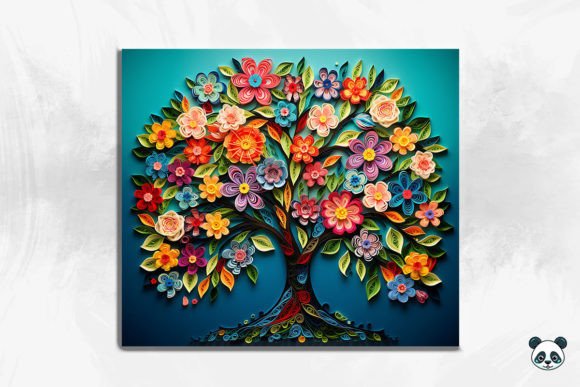
Mastering Your Sublimation Projects with the 3D Tree of Life Tumbler Wrap 13
There is a distinct satisfaction in holding a custom tumbler that looks professionally manufactured rather than home-printed. The difference often lies in the design file itself. When you are looking to elevate your product line, the 3D Tree of Life Tumbler Wrap 13 offers a sophisticated solution for creating stunning 20 oz skinny tumblers. This specific design leverages depth and texture to make the iconic Tree of Life motif pop against the curve of the cup. However, possessing a high-quality digital file is only half the battle. Many creators, from hobbyists to small business owners, stumble not because of the artwork, but because of how they prepare, size, and apply these instant digital downloads.
Understanding exactly what you are getting when you purchase a file like this is the first step toward success. The package typically includes a single high-resolution PNG file, sized approximately 9.3 inches by 8.2 inches at 300 DPI. While "instant download" sounds simple, it implies that you are responsible for the technical execution. There is no physical product shipped to you, and there is no hand-holding through your printer settings. If you assume the file will automatically fit every brand of 20 oz skinny tumbler without adjustment, you are setting yourself up for wasted blanks and frustration.
The Trap of Assuming One Size Fits All
A common misconception in the sublimation community is that a "skinny tumbler wrap" is a universal standard. In reality, manufacturers vary slightly in the diameter and height of their blanks. The 3D Tree of Life Tumbler Wrap 13 is designed with specific dimensions (9.3 x 8.2 inches) to cover the majority of standard 20 oz straight tumblers. However, if you do not measure your specific blank before printing, you risk two major issues: overlapping seams that look messy or gaps that leave white space exposed.
To avoid this, always measure the circumference and the printable height of your tumbler before you hit print. If your blank is slightly taller than the design, you may need to add a background extension or adjust your canvas size in your editing software. Conversely, if the tumbler is shorter, you must scale the image down proportionally. Never stretch the image to fit, as this will distort the intricate branches and leaves of the Tree of Life seamless pattern, ruining the 3D effect you paid for. A better approach is to use the provided dimensions as a baseline and create a mockup in your design software to visualize the fit before committing ink to paper.
Overlooking the Importance of DPI and File Formats
Another frequent error involves ignoring the technical specifications of the download. The file provided is a PNG at 300 DPI. This resolution is critical for crisp lines and vibrant colors. Some users attempt to convert these files into vector formats (like SVG) hoping to resize them infinitely without quality loss. While this works for simple logos, it often creates jagged edges and artifacts on complex, photo-realistic designs like a watercolor Tree of Life or a 3D background.
Stick to the native PNG format for sublimation. It preserves the transparency and the subtle gradients that give the tree its dimensional look. If you find the image appears pixelated on your screen, zoom out to 100% view; sublimation printers handle high-resolution data differently than monitors do. Ensuring your printer settings are set to "High Quality" or "Photo" mode is just as important as the file resolution itself. Using draft mode to save ink will result in a muddy, low-contrast finish that fails to showcase the depth of the 3D design.
Mismanaging the Seamless Pattern Alignment
The beauty of the Tree of Life 3D seamless pattern lies in its ability to wrap around the cylinder without a visible break. However, achieving this seamless look requires precise alignment during the wrapping process. A common mistake is applying the sublimation paper loosely or unevenly. If the paper shifts while in the heat press or convection oven, the pattern will not align at the seam, creating a distracting vertical line that breaks the illusion of the tree encircling the cup.
To correct this, use high-heat resistant tape generously. Secure the top and bottom edges first, ensuring the design is centered vertically. Then, pull the paper taut around the circumference before taping the seam. For the 3D Tree of Life Tumbler Wrap 13 Background, pay extra attention to the edges where the pattern repeats. If your tumbler has a ridge near the top or bottom, ensure the design does not get cut off by the taper of the cup. It is often wise to print a test copy on regular paper, wrap it around the blank, and mark your alignment points before sublimating.
Color Management and Printer Profiles
What you see on your monitor is rarely what comes out of the printer, especially with rich, dark backgrounds found in many Tree of Life png files. Beginners often skip color profiling, leading to prints that look washed out or overly dark. The deep greens and earthy tones of the tree can easily turn into indistinguishable blobs if the ink saturation is too high.
Invest time in creating or downloading an ICC profile specific to your printer, ink, and paper combination. Perform a test strip to check color accuracy. If the blacks are too heavy, reduce the ink density in your printer settings. Remember, sublimation ink turns into gas under heat; if you lay down too much ink initially, it can bleed, causing the fine details of the branches to blur. A lighter, more accurate print often yields a sharper final result after pressing.
Final Checks Before You Press
Before you commit to a production run, verify that you have the right equipment and knowledge. This item is a digital file; it does not include instructions on how to operate your heat press. Ensure you know the correct time, temperature, and pressure settings for your specific tumbler blank. Over-pressing can scorch the coating, while under-pressing leads to ghosting.
Additionally, consider the end-user experience. If you are selling these tumblers, the Tree of Life skinny tumbler design should be free of scratches and blemishes. Handle the blanks with gloves to avoid oils transferring to the surface before pressing. By treating the digital file with the same care as the physical product, you ensure that the 3D tumbler wrap delivers the premium look your customers expect. Taking these corrective steps transforms a simple download into a professional-grade asset for your business.